AI Product Photos for Ecommerce: Build the Gallery
Build a product gallery that identifies the item, answers detail questions and uses generated scenes where they add useful context.
By CREATR editorial team · Published · Updated
Try Product Photo Packs with a product image you have approved before preparing assets for publication.
Which image should lead the product gallery?
Choose a view that makes the exact item and variant immediately recognizable. Keep the full relevant product visible and use enough separation from the background for a small thumbnail to remain legible.
Do not choose the leading image only by how dramatic it looks. A wide lifestyle scene can make a small product difficult to identify. An extreme detail can conceal the overall item. A photograph of several colors can leave the shopper uncertain about which one is selected.
The channel also matters. Your own storefront may allow a composition that would be unsuitable for a shopping feed. Consult Google Merchant Center's primary image requirements when preparing feed imagery, including the restrictions on added promotional elements and representing the exact item.
| View | Question | Review requirement |
|---|---|---|
| Complete product | What am I buying? | Correct SKU and selected variant |
| Important detail | Does this feature suit my need? | Readable or clearly visible evidence |
| Scale or fit | Will it work for me? | Dependable dimensions or real reference |
| Included contents | What arrives in the package? | No implied extra accessories |
| Supporting context | Where could I use it? | Accurate product in a relevant setting |
How do you identify the detail views the page actually needs?
Look for purchase decisions that depend on a visible feature. A backpack may need its opening, interior organization and strap attachments. A kitchen tool may need the working surface and handle. A skincare product may need readable packaging information.
Use real customer questions as input, then check whether an image can answer them accurately. If shoppers ask about compatibility, a photo may help identify the connector but still needs correct written specifications. Imagery should support the product record rather than replace it.
Capture missing details physically. A generated unseen angle cannot establish what is on the back of the actual item. Keep those views controlled even when the rest of the gallery uses generated backgrounds.
How would you plan a gallery for one product?
For an illustrative pair of sunglasses, begin with the complete selected frame on a neutral background. Add a hinge and temple detail if they affect the choice. Include a real size reference or accurate measurements, then show the case and accessories that are actually included.
A supporting outdoor scene can add a campaign mood once those questions are answered. A worn image needs separate scrutiny: the frame shape, lens tint, fit and scale should remain believable and consistent with the product information.
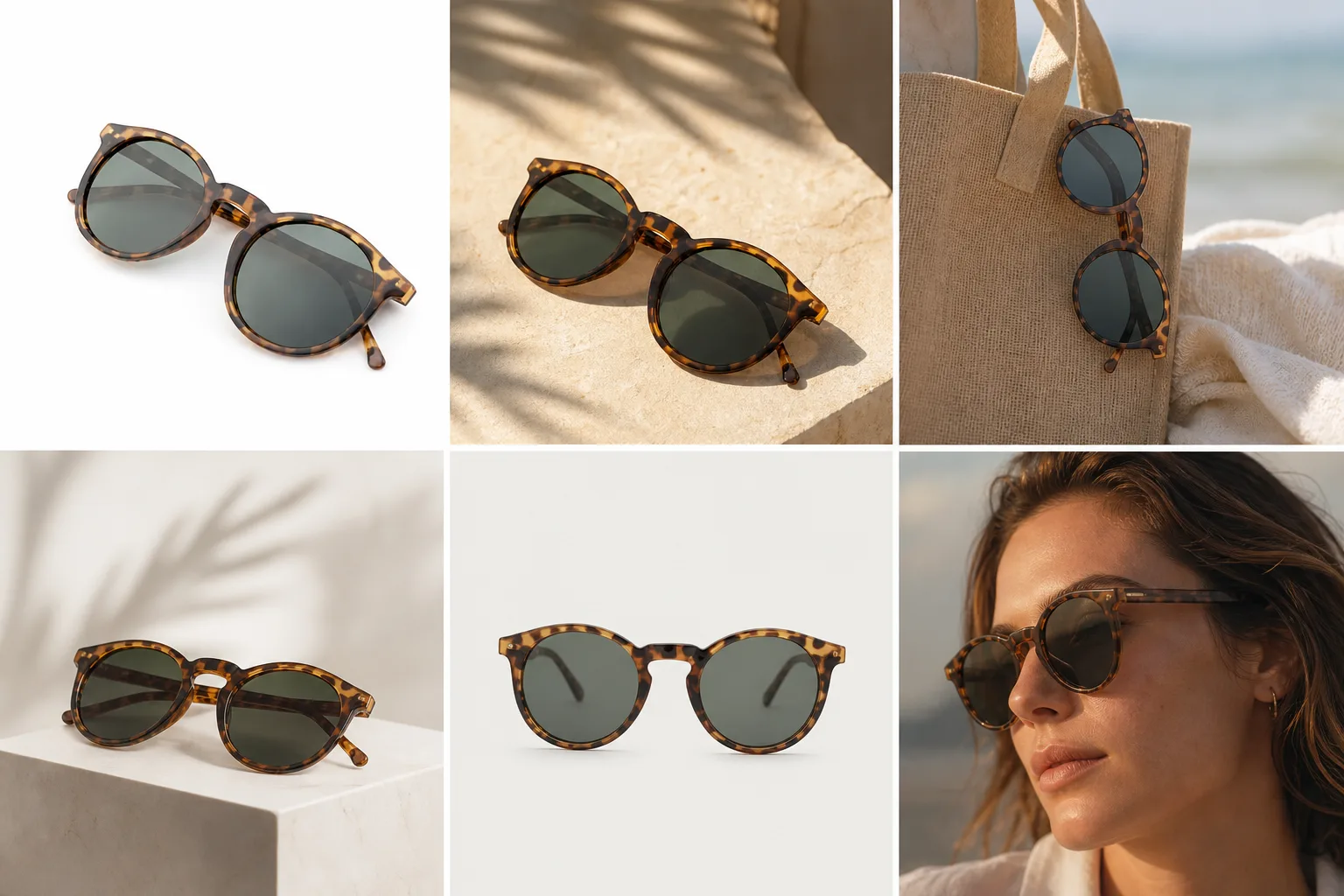
The sample sequence is not a requirement to publish a fixed number of images. A simple product may need fewer views; a complex one may need a demonstration. Keep an image only if it answers a distinct question or provides a useful campaign asset.
What should the reviewer check before approval?
Compare each image with the actual product and approved source. Inspect branding, component count, material, finish, closures and proportions. Check whether props suggest an included item or unsupported capability.
Review the sequence as well as the individual files. The same variant should remain consistent from the first image to the last. A gallery that switches between old packaging and a new label can create confusion even when every photograph is attractive.
Then open the mobile page. Confirm that thumbnails are distinguishable, the first image is not cropped awkwardly and detail views can actually be inspected. A useful desktop gallery can become repetitive or unclear in a small mobile carousel.
How do you deliver storefront and shopping-feed files?
Retain an approved master and prepare channel-specific versions. Record which file is the primary listing image, which are additional detail views and which are campaign assets. Do not let a sale banner with added text accidentally become the shopping-feed primary image.
Use the destination's current requirements for file acceptance and presentation. Shopify's media upload guide covers adding and organizing product media; storefront inspection is still needed after saving.
For generated assets, retain required provenance metadata through editing and upload. Google includes AI metadata instructions in its image guidance. Verify the final delivery file rather than assuming every compression tool preserves the original metadata.
How do you measure whether the gallery helped?
Define the problem first. If customers cannot understand an included part, a new detail view has a different goal from a campaign image designed to attract attention. Record the change, the date and the product's other relevant changes.
Watch the measures appropriate to the task, such as recurring customer questions, product-page behavior, purchases and return reasons. Seasonality, price changes, traffic quality and availability can affect those outcomes. A short before-and-after comparison does not isolate the image's effect.
Keep the previous files and gallery order so a weak change can be reversed. Use a controlled experiment when traffic and tooling allow it. At smaller volumes, describe observations cautiously and avoid turning a few orders into a claimed conversion lift.
When should you stop adding more images?
Stop when the next image repeats a question already answered or distracts from the product. More similar lifestyle views can push important detail evidence farther down the gallery.
If the source is the problem, use the capture setup guide. If a supporting scene is missing, use the lifestyle brief and review guide. For the overall production plan, return to the product photography planning guide.
Frequently asked questions
How many images does an ecommerce product need?
Enough to answer its distinct buying questions. Choose views by product complexity and customer needs rather than adding a fixed number of near-identical images.
Can AI generate missing factual angles for my gallery?
It may produce a plausible view, but plausibility does not establish the actual hidden product detail. Photograph unseen features when they affect the purchase.
Should campaign assets and listing images share one folder?
They can share a product record, but label their roles clearly. Keep approved source, listing, detail and campaign versions distinguishable so the wrong treatment is not published to a restricted placement.
Tools for this workflow
- Product Photo Packs: Build a coordinated image set for a listing or product launch.
- 9X Product Views: Create a set of product views, then check each angle against the source.
- 3D Product Models: Generate a product model and inspect its shape before using it in a storefront.