Ecommerce Product Photography Guide
Strong product photography does more than make a store look polished. It answers questions, reduces hesitation, and gives shoppers a clearer reason to buy.
Online shoppers cannot pick up an item, feel its texture, or compare its size in person. Product photos need to show those details clearly enough for someone to decide whether the item meets their needs.
Why ecommerce product photography affects conversion and brand trust
A product page is a decision page. Every image either helps the customer move forward or creates doubt. Clear, consistent photography lowers friction because the shopper can quickly understand what the product is, what it looks like from different angles, and how it might fit into daily life.
Dark images, awkward crops, and inconsistent color make a catalog harder to assess. Use consistent lighting and framing so shoppers can compare products without wondering whether a difference comes from the item or the photograph.
The strongest product images tend to communicate four things at once:
- Clarity: the shopper can identify the product instantly
- Consistency: every SKU and collection feels part of the same brand system
- Accuracy: colors, materials, and details match the real item
- Emotion: the image helps the buyer picture ownership or use
That mix matters across every channel, from a Shopify product page to an Etsy listing, an Instagram ad, or a marketplace search result.
Core image types for ecommerce product photography
Most stores need more than one kind of image. A single white-background shot is rarely enough to support ads, social content, product detail pages, email campaigns, and retargeting.
Use studio photos to show the product clearly, lifestyle images to explain its setting or use, and close-ups to reveal details. A short video can show movement or a feature that is difficult to explain in a still image.
Image type | Primary purpose | What it should show | Common use cases |
|---|---|---|---|
Hero image | Immediate recognition | Full product, clean angle, distraction-free background | Product pages, marketplaces, collection grids |
Alternate angle | Better evaluation | Side, back, top, or underside views | Product detail pages |
Detail shot | Reduce doubt | Texture, stitching, ingredients, buttons, ports, finish | PDPs, premium products |
Scale image | Clarify size | Product in hand, beside common object, worn or placed in space | Home goods, beauty, accessories, electronics |
Lifestyle image | Create relevance | Product in a real setting or in use | Ads, email, landing pages, social |
Group shot | Support bundling | Variants, kits, coordinated collections | Upsell sections, campaigns |
Video or motion clip | Increase attention | Rotation, use case, before-and-after, unboxing | Paid social, PDP galleries, retargeting |
A strong catalog usually starts with a reliable core set, then expands into campaign-ready assets. That approach keeps the brand steady while giving the marketing team more ways to publish.
How to plan a product photography shoot for online stores
Good results start long before the camera turns on. Planning saves budget, shortens approval cycles, and produces a more useful asset library.
Start with the sales channel requirements. Amazon, Etsy, Shopify, Meta ads, and email banners all have different image behaviors and crop expectations. A shoot planned only for the product page may leave major gaps for ads or social. It helps to map each product to the placements where it will appear.
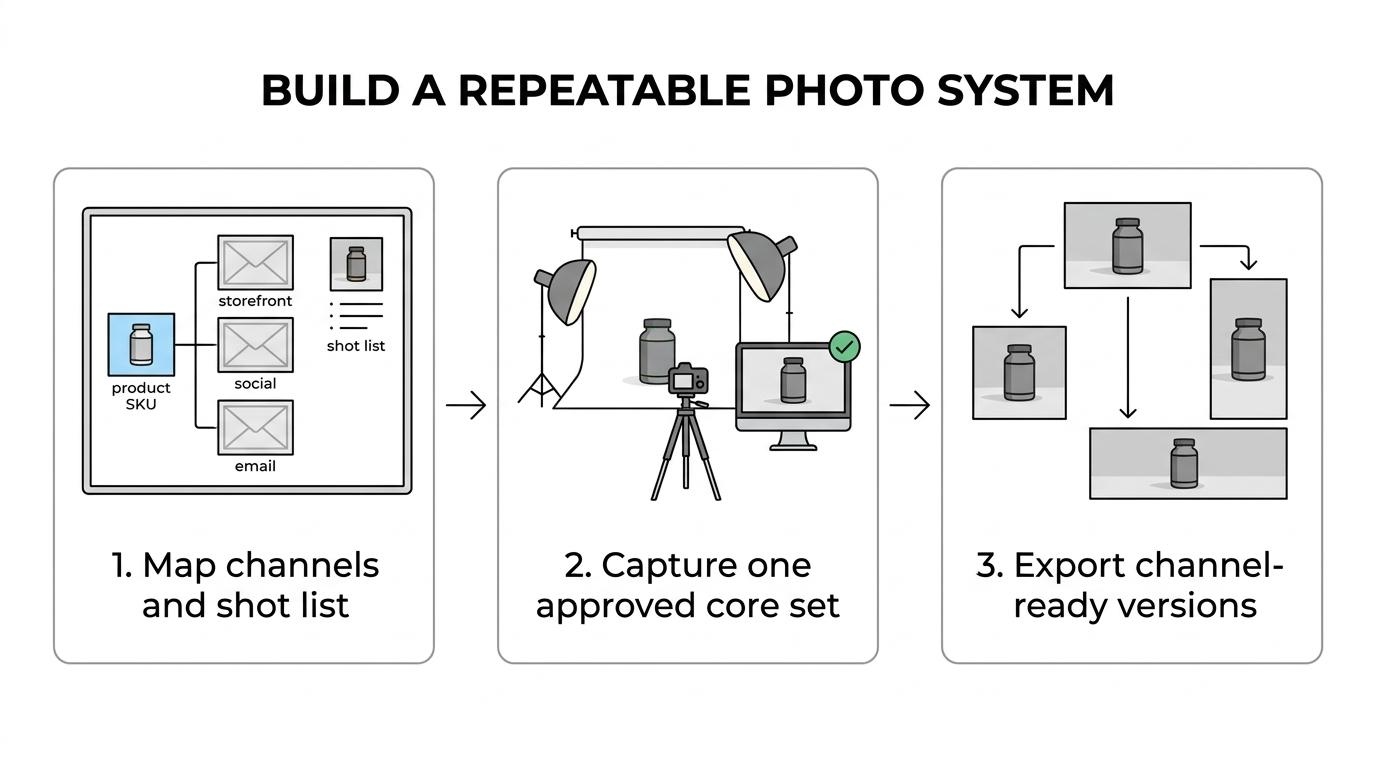
Then define the shot list with precision. Instead of writing “lifestyle images,” write “kitchen countertop scene with product front label visible” or “close crop showing zipper pull and interior lining.” This level of detail speeds production and gives reviewers a cleaner approval path.
Before shoot day, lock down the operational basics:
- shot list by SKU
- aspect ratios by channel
- packaging and props
- variant sequencing
- naming conventions
- approval owner
Product photography standards for marketplaces and social commerce
Marketplaces usually reward consistency and clarity, while social channels reward context and visual energy. The same product may need both a neutral pack shot and a scene-based version to perform well across channels.
Best lighting and camera setup for ecommerce product photography
Studio lighting is the foundation of e-commerce photography because it defines texture, shape, and realism. Soft, even light is often the safest starting point for most products. It reveals details without creating harsh shadows that distract from the item itself.
For small products, a simple setup can work very well: a table, a neutral sweep background, diffused lighting from both sides, and a reflector to fill shadows. For reflective items like jewelry, glass, or electronics, light control becomes more technical. Scrims, flags, and careful angle changes help reduce glare while keeping edges crisp.
A mirrorless camera gives you control over exposure and focus; a smartphone can also produce useful product images with suitable lighting. Use a tripod, a fixed shooting distance, and consistent settings so framing and sharpness remain steady across the catalog.
White balance deserves special attention. If one image runs warm and another cool, the collection starts to feel unreliable. That inconsistency is especially damaging for beauty, fashion, furniture, and food, where color accuracy has a direct effect on returns and customer satisfaction.
Styling and composition tips for product photos that sell
Keep the product easy to recognize. Choose a composition that shows the features a shopper needs to evaluate.
Negative space can be powerful when used with intent. It gives text overlays room in paid media and keeps the product readable in small mobile crops. At the same time, too much empty space can make the item feel distant or undersized. The right balance depends on the product category and the intended placement.
Choose styling that fits the product and brand. Clean surfaces and a few props may suit skincare; a furnished room can help explain how home goods look in use. Keep props from hiding features or changing the apparent color of the item.
Use these checks when composing a shot:
- Scale cues: include a hand, model, or familiar object when size is easy to misjudge
- Texture cues: use light and angle to show grain, fabric, finish, or thickness
- Color control: keep backgrounds and props from shifting the perceived product color
- Negative space: leave room where the image may later need text, pricing, or CTA overlays
Some products also benefit from restraint. A technical item with many small details often performs better when the scene is simpler and the frame is more direct.
Editing and file preparation for ecommerce product images
Edit for accurate color, clear detail, and a clean presentation. Preserve the product’s texture, proportions, and finish so the image sets a realistic expectation of what will arrive.
Color correction, dust cleanup, edge refinement, and background cleanup are standard steps. Retouching becomes more delicate when logos, printed labels, or product text are involved. Those brand details need to stay legible and accurate, especially for regulated categories or products where packaging influences the purchase.
File preparation matters almost as much as the edit itself. Images need to load quickly while still looking sharp on high-resolution screens. That balance also matters beyond the storefront, and Seo.ai’s breakdown of the Google feed specification shows how image formatting and asset quality can affect whether products are presented cleanly across shopping surfaces.
Teams usually benefit from creating multiple exports from the same approved source: high-res originals, optimized web images, square social crops, vertical ad crops, and thumbnail-safe versions.
Naming conventions are worth the discipline. If the marketing team cannot locate the right angle or version quickly, the value of the asset drops. Clear filenames, SKU tagging, and version control keep the library usable as the catalog grows.
Common ecommerce product photography mistakes that weaken results
Review each image for information a customer might be missing. A photograph can look attractive while leaving the size, finish, or most useful feature unclear.
A beautiful image can still hurt conversion if it hides scale, crops off key details, or makes the product color look different from reality. Teams also run into trouble when each new launch is shot in a slightly different style, creating a catalog that feels pieced together rather than intentionally branded.
Common issues include:
- inconsistent shadows from image to image
- backgrounds that are too gray, too warm, or visibly uneven
- retouching that removes realistic texture
- detail shots that never show the most important feature
- lifestyle scenes where the product becomes secondary
- mixed aspect ratios that break gallery layouts
Keep an approved reference image and a short capture-and-editing checklist. Compare new images against them before publishing.
AI tools and scalable ecommerce product photography workflows
As product catalogs grow, traditional production alone can become too slow or too costly to support every campaign need. That has pushed many e-commerce teams toward hybrid workflows, where core product imagery is captured once and then extended with AI-assisted asset creation.
AI-assisted tools can help create lifestyle scenes, seasonal variations, ads, and motion assets from approved product imagery. Review each output for product shape, proportions, logos, and label text before using it. A consistent source image gives the team a reference for that review.
Approve the source image first, then review every generated variation against it. Keep the same accuracy standards for photography and AI-assisted assets.
For a small team managing launches, promotions, and paid social, this approach can reduce repeated production work. Allow time to check and correct the results before publishing.
Building a repeatable ecommerce product photography system
Document the angles, backgrounds, lighting, crop ratios, editing standards, and approval steps used for your catalog. Reuse those instructions for new launches and seasonal campaigns.
With a standard set of product views in place, the team can spend more time adapting images for campaigns and testing which placements need additional shots.
A strong system often starts small: one approved hero image, a clear shot list, a reliable lighting setup, and a naming convention the whole team uses. From there, the asset library can expand into lifestyle content, video, ad creative, and richer product experiences without losing brand control.
Keep approved originals, channel exports, and version information together so the next person can find and reuse the correct files.
How much does an ecommerce photoshoot cost?
Ecommerce product photography costs typically range from a few hundred dollars to several thousand, depending on scope, complexity, and production requirements.
Simple studio shoots with professional studio lighting cost less; elaborate productions require larger budgets.
Pricing often depends on the number of products and images, styling, location, models, retouching, and usage rights. Per-image rates may suit small catalogs, while day rates can offer better value for larger, carefully planned shoots. Request itemized estimates and confirm deliverables before booking.
To manage costs, prioritize essential product views and group similar items into one session. Prepare samples, props, and shot lists in advance to reduce reshoots. For ongoing needs, compare traditional production with hybrid or AI-assisted workflows, while ensuring every final image accurately represents the product and meets your sales channel’s requirements.
What makes product photos stand out?
Standout product photos combine clarity, thoughtful composition, and accurate color, helping shoppers notice key features and quickly understand what makes an item compelling.
Soft, controlled lighting reveals shape and texture without distracting glare or harsh shadows. A clean composition keeps attention on the product, while carefully chosen angles make its design easy to assess. Consistent color and realistic detail build confidence; purposeful styling adds character without obscuring what customers are considering.
Context can make an image more memorable. Use lifestyle shots to show scale or the product in use when that answers a likely question. For campaigns, leave useful breathing room for text and crops, but keep the item prominent and unmistakable.
The strongest visual choices reflect both the brand and the buyer’s needs. A refined background may suit a premium accessory, while a lived-in setting can help shoppers imagine home goods in their own space. In every case, prioritize authenticity: polished images should make the real product look its best, not create expectations it cannot meet.
FAQ
Should photos show products in use?
Yes, when they explain scale, function, or fit. Pair in-use photos with clear studio views so shoppers can see both the product and its context.
Show the item being used naturally, with key features visible. A chair in a room, a bag being carried, or a tool in use can answer practical questions. Avoid scenes that obscure details or imply uses the product cannot support.
Which background works best?
A white or neutral background is a useful starting point for catalog images. Keep it smooth and evenly lit, and check the destination’s image requirements before shooting.
For lifestyle images, choose surroundings that explain the product: a kitchen surface for cookware or an uncluttered room for furniture. Keep props and background colors from changing how the item appears. Plan space for crops and text where the placement requires it.
How do you show product scale?
Show the product beside a familiar object, in a hand, or in its intended setting. Choose a reference whose size shoppers can reasonably judge, and keep it close enough for a useful comparison.
Show wearable products on a model and furniture in a room. Keep perspective natural, avoid wide-angle distortion, and include measurements in the listing. Pair close-ups with wider views when a single image leaves size ambiguous.
What makes a product photo effective?
An effective product photo answers a buyer’s question. Sharp focus, faithful color, and useful angles make the item’s shape, finish, and features clear.
Keep lighting and framing consistent across the set, while varying the views to show useful information. Check the final crop at its intended display size so the product remains recognizable and important details stay visible.